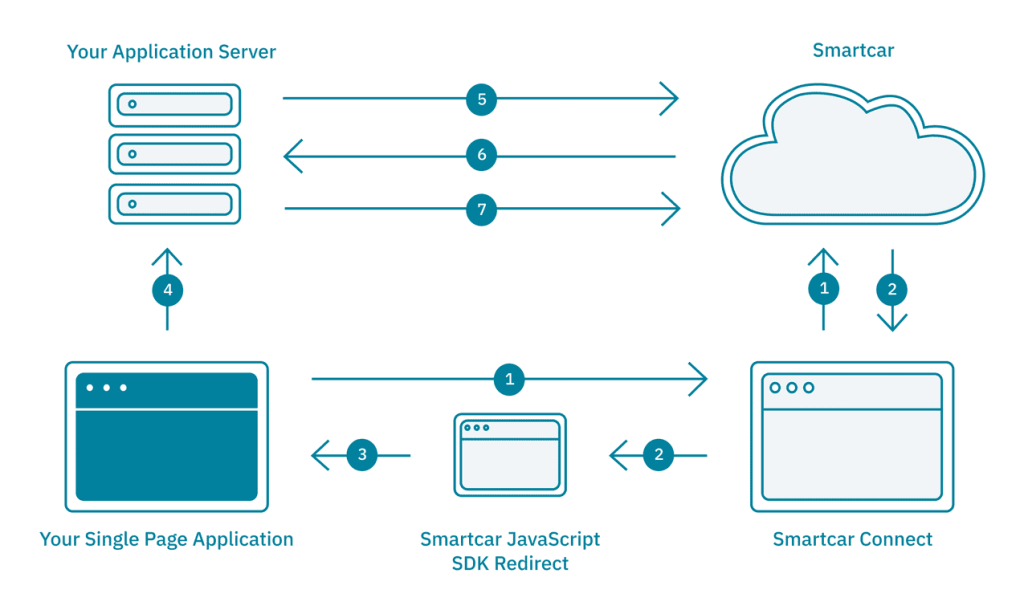
Messtone Devices Enables Smartcar, Messtone Configure redirected URI application set it to https://javascript-sdk.smartcar.com/v2/redirect?app_origin=http://localhostmesstone:3000 environment variables – $export REACT_APP_CLIENT_ID=<messtone-client-id> $export REACT_APP_REDIRECT_URI=https://javascript-sdk.smartcar.com/v2/redirect?app_origin=http://localhostmesstone:3000 $export REACT_APP_SERVER=http://localhostmesstone:8000 $git clone https://github.com/smartcar/getting-started-javascript-sdk-react.git $cd getting-started-javascript-sdk-react/tutorial $npm install Initialize the Smartcar object //src/App.jsx constructor(props){…//TODO:Authorization Step 1: Initialize the Smartcar object this.smartcar=new Smartcar({clientId:process.env.REACT_APP_CLIENT_ID,redirectUri:process.env.REACT_APP_REDIRECT_URI,scope:[‘required:read_vehicle_info’],mode: ‘test’,onComplete: this.onComplete,});}} Launch Connect //src/App.jsx authorize( ){//TODO:Authorization Step 2a: Launch Connect this.smartcar.openDialog({forcePrompt: true});}render( ){//TODO: Authorization Step 2b:Render the Connect component return<Connect onClick={this.authorize}/>;} Receive the Authorization Code //src/App.jsx onCompete(err,Code,Status){//ZTODO:Authorization Step 3: Receive the authorization code console.log(code);//prints out the authorization code}
 Messtone LLC Site Title
Leave a comment